Essential Accessories for a Comfortable Home Office
Transform your workspace with ergonomic gear, smart lighting, and clutter-cutting tools that boost comfort, focus, and well-being all day.
Ergonomic Seating and Support
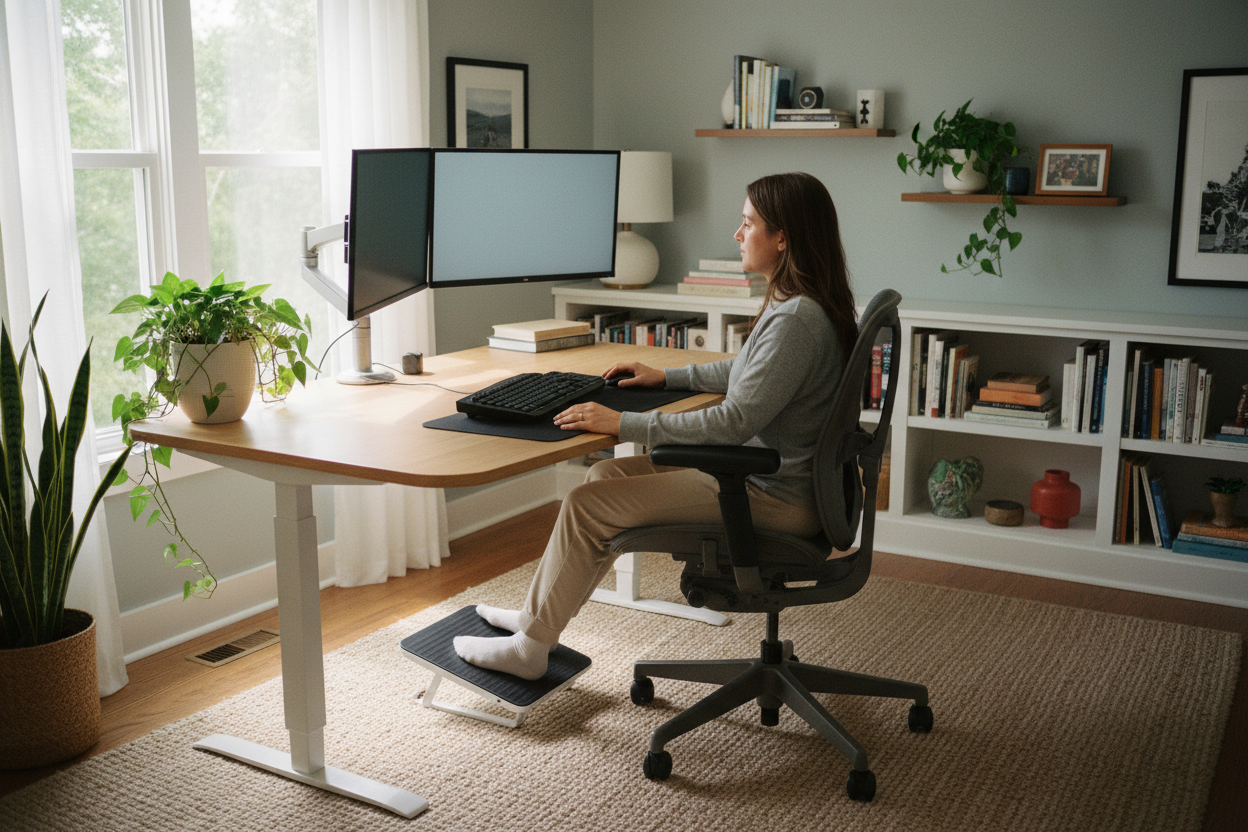
A comfortable home office starts with ergonomics, and the chair is the anchor of that setup. Look for a model with lumbar support that aligns with the natural curve of your spine, plus adjustable armrests to keep shoulders relaxed while typing. A seat with height and depth adjustment helps distribute weight evenly and prevents pressure behind the knees. Materials matter, too; breathable mesh promotes airflow in warm environments, while memory foam cushions add plush stability. Consider a headrest to reduce neck strain during long research or video calls. A compact footrest can further optimize posture by keeping hips and knees at comfortable angles. For those who move frequently, smooth casters and a sturdy base support safe repositioning. Small enhancements like a wrist rest and seat cushion can refine comfort without replacing furniture. Together, these accessories create a stable foundation that keeps you supported as you navigate apps, documents, and creative tools throughout the workday.
Adjustable Desks and Stands
A flexible workstation brings balance to screen-heavy tasks, and an adjustable sit-stand desk is a standout accessory. Switching between seated and standing positions promotes circulation, reduces stiffness, and sustains focus during long sessions of writing, coding, or editing. If you already have a desk, a desk converter offers similar benefits with minimal disruption. Add a sturdy laptop stand to raise the screen to eye level and pair it with an external keyboard and mouse for healthy alignment. A monitor riser or VESA arm lets you fine-tune height, tilt, and distance, keeping your neck and shoulders at ease. To support standing sessions, an anti-fatigue mat cushions joints and encourages gentle micro-movements. A smooth desk pad can improve mouse tracking and protect surfaces from daily wear. Together, these accessories adapt to your workflow, blending comfort with productivity so you can shift postures naturally while tackling spreadsheets, design boards, or video conferences.
Monitors and Display Comfort
Clarity and positioning define visual comfort, making your monitor setup a crucial investment. Choose a panel with reliable color accuracy and wide viewing angles so text stays crisp and graphics remain consistent. A practical size with balanced pixel density supports multitasking without overwhelming your space, while a gentle matte finish helps reduce glare. A monitor arm or height-adjustable stand brings the top of the screen to eye level and allows you to dial in distance, curbing neck strain. If you rely on multiple apps, a dual-monitor arrangement or an ultrawide display boosts efficiency by keeping windows visible side by side. To ease eye fatigue, enable blue light reduction and fine-tune brightness and contrast for your room's lighting. Subtle bias lighting behind the screen can reduce perceived contrast and soften focus transitions. Consider a privacy filter for shared spaces and a simple calibration routine to maintain consistent tones for presentations, spreadsheets, or creative work.
Keyboards and Mice for Productivity
Your input devices shape comfort and speed, making a well-matched keyboard and mouse essential. An ergonomic split keyboard supports neutral wrist angles, while a mechanical keyboard offers crisp feedback for accurate typing. If you prefer quiet environments, look for silent switches and low-profile designs that reduce finger travel. A wrist rest made of gel or memory foam can relieve pressure during extended sessions. For pointing, a vertical mouse encourages a natural handshake posture, and a trackball provides precision without constant arm movement. Adjustable DPI settings fine-tune cursor speed, while programmable buttons streamline repetitive actions such as copy, paste, or window switching. Reliable Bluetooth or 2.4 GHz wireless connections minimize cable clutter; pairing with a single USB receiver can simplify multi-device setups. Complement these tools with key remapping software and shortcut training to reduce strain and accelerate tasks, particularly when navigating spreadsheets, editing timelines, or organizing cloud documents.
Lighting and Visual Well-Being
Balanced lighting keeps your eyes comfortable and your workspace inviting. Start with a focused LED desk lamp that offers adjustable color temperature and brightness, so you can tune light for reading, writing, or photo editing. Soft, even ambient lighting helps limit harsh contrast between your displays and the room, reducing fatigue over long sessions. Consider bias lighting behind your monitor to ease eye strain and enhance perceived clarity. Attention to CRI helps colors appear natural when reviewing images or design elements. Position lights to avoid glare on screens and reflective surfaces, and use shades or diffusers to soften hotspots. If you appear regularly on video calls, a small, dimmable fill light can improve visibility without overwhelming the scene. Smart dimming controls and preset scenes support smooth transitions from focus work to creative thinking. Thoughtful lighting design elevates every task, making spreadsheets, coding, and presentations more comfortable and precise.
Audio Tools for Focused Work
Clear sound can transform a busy home into a productive studio. Noise-cancelling headphones create a quiet zone for writing and analysis, while comfortable ear cushions reduce fatigue during longer stretches. For calls and recordings, a reliable USB microphone with a pop filter improves clarity and cuts plosives, and a compact boom arm keeps the mic positioned out of the way. If you host group meetings, a conference speakerphone with beamforming helps everyone be heard. Strategic acoustic panels or soft furnishings can tame echo and make dialogue more intelligible in hard-walled rooms. Value the convenience of mute controls, sidetone monitoring, and on-cable volume for quick adjustments. When privacy matters, closed-back headphones limit sound leakage; for comfort in warmer spaces, breathable materials and lightweight headbands are helpful. Together, these audio accessories streamline collaboration, reduce listening fatigue, and keep your concentration intact as you switch between calls, tutorials, and focused deep work.
Cable Management and Power Safety
A tidy desk supports both comfort and reliability. Start with a USB-C dock or Thunderbolt dock to centralize peripherals, video outputs, and storage, reducing daily plug and unplug routines. Use cable sleeves, Velcro ties, and under-desk trays to route cords neatly and clear legroom. Label each line near both ends to simplify troubleshooting and upgrades. Protect your equipment with a surge protector that offers spaced outlets for bulky adapters and includes overload indicators. For uninterrupted work during brief outages, a compact UPS can keep your router, monitor, and computer running long enough to save progress. Add a wireless charging pad for your phone to cut down stray cables and keep devices topped up. Consider a KVM switch if you share one setup between a work laptop and a personal computer. With clean power and streamlined connectivity, your home office feels calmer, safer, and more efficient throughout demanding workdays.